

A technical SEO audit is a review of your site's foundation: Whether search engines and AI answer engines can crawl it, render it, index it, and trust it enough to rank or cite it. It's everything under the hood (robots.txt, rendering, canonicals, site speed, schema, internal links) that decides whether your content even gets a shot.
We run these for every client at Ten Speed, and we run them on our own site too. On B2B sites, the problems are rarely obvious. A pricing page Googlebot can't fully render still looks fine in your browser. A comparison page that got noindexed during a content management system (CMS) update still loads for every visitor. Nothing looks broken. The page just stops showing up in search results and AI answers, and nobody notices until pipeline takes a hit.
This guide covers what a technical SEO audit is, what it should include, how to run one step by step, and how to decide what to fix first. We audit for SEO and AEO (answer engine optimization) at the same time, because it's the same foundation. If Google can't crawl and index a page, there's a good chance ChatGPT, Perplexity, and Google's AI Overviews can't use it either.
Key takeaways
- A technical SEO audit checks whether search engines and AI answer engines can crawl, render, index, and trust your site. It's one audit with two outcomes: rankings in search and citations in AI answers.
- Start with the blockers (crawling, indexing, rendering), then fix the sitewide issues that clear hundreds of URLs at once, then work through your revenue pages.
- Every issue needs an owner. Most audits stall because nobody decided who fixes what (your dev team, your SEO/AEO team, or your agency).
- AI readiness is part of the audit now: making sure nothing blocks AI crawlers, pages that render without JavaScript, schema that tells machines what a page is, and server logs that show which AI bots actually visit your pages.
- Once fixes go live, recrawl the site, check indexing, and compare AI visibility to your baseline to confirm they worked.
- Run a full audit every other quarter, plus right before and after any migration, redesign, or CMS change.
What is a technical SEO audit?
A technical SEO audit is a structured review of the infrastructure that lets search engines and AI systems find your pages, read them, and decide whether to show them. Content audits look at what you say. Link and authority work looks at who vouches for you. A technical audit checks whether any of that can actually reach Google, ChatGPT, or Perplexity in the first place.
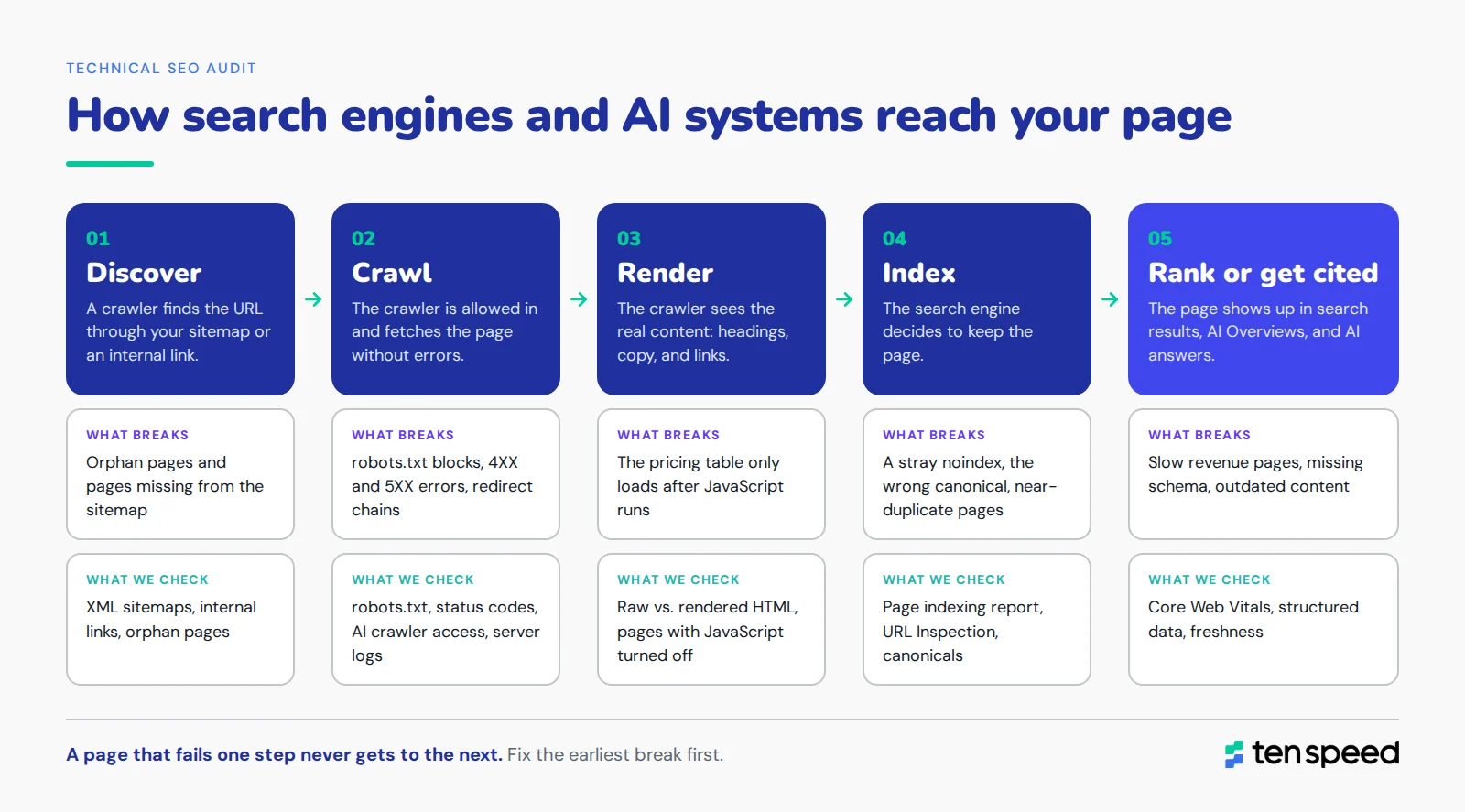
Every page goes through the same path before it can rank or get cited:
- Discover. A crawler finds the URL through your sitemap or an internal link.
- Crawl. The crawler is allowed in (robots.txt) and fetches the page without errors.
- Render. The crawler sees the real content (headings, copy, links), even if some of it loads with JavaScript.
- Index. The search engine decides to keep the page (right canonical, no stray noindex, not a duplicate).
- Rank or get cited. The page shows up in search results, AI Overviews, and AI answers.
A technical audit checks each of these steps to find which pages are failing, which step they fail at, and why. We check them in that order, because a page that fails one step never gets to the next (so perfect schema does nothing for a page Google never indexed).
Technical SEO audit vs. SEO audit vs. content audit vs. AEO audit
People use these terms interchangeably, and they shouldn't. A technical audit is one piece of a bigger picture. Here's how we separate them.
The technical audit is the base layer for all of them. You can do a great content audit and write a great AEO strategy, but if the pages can't be crawled or rendered, none of it shows up.
Why technical SEO audits matter
Technical problems can have a major negative impact on your business if they're left alone. Pages drop out of search results and AI answers, organic traffic and demo requests go down, and the content your team spent months creating stops producing. Most of these problems also don't show an obvious error, so they can go on for months before anyone notices.
A few examples we see all the time on B2B sites:
- A noindex tag that shipped with a template update. The page loads fine for every visitor and shows up in your analytics from other channels. It gets zero organic traffic and never gets cited, and nobody knows why.
- A feature page built in React that sends almost no HTML to crawlers. It looks complete in the browser. Google sees a near-empty page, and many AI crawlers see nothing at all.
- Hundreds of integration or parameter URLs eating crawl time. Googlebot spends its visits on low-value pages and recrawls your comparison and pricing pages slowly, so updates take weeks to show up.
- Redirect chains left over from the last site migration. Every hop wastes crawl time and weakens the signal about which URL is the real one.
These are technical problems, and more content won't fix them. That's why we usually run a technical audit before we build a content roadmap. It's like adding rooms to a house with a cracked foundation. You can keep building (new posts, new pages), but everything you add sits on the same problem until you fix the foundation.
These problems also compound. B2B sites get more complicated every year (new product pages, docs, integrations, campaign pages), and every new section adds more chances for something to break. Regular audits catch problems while they're small and cheap to fix, instead of after a traffic drop. For the bigger picture on prioritizing technical work by revenue impact, see our guide to technical SEO for B2B.
What a technical SEO audit covers
A full audit covers eight core areas. Every one of them affects both SEO and AEO, so we look at both impacts for each.
Crawlability and indexation
Every audit starts here. If a page can't be crawled or indexed, nothing else on this list matters for it. We check that robots.txt isn't blocking anything it shouldn't (we've seen whole blog directories blocked for months), that the XML sitemap is in Search Console with a "Success" status and only lists pages you want indexed, and that noindex tags only sit on pages you want hidden.
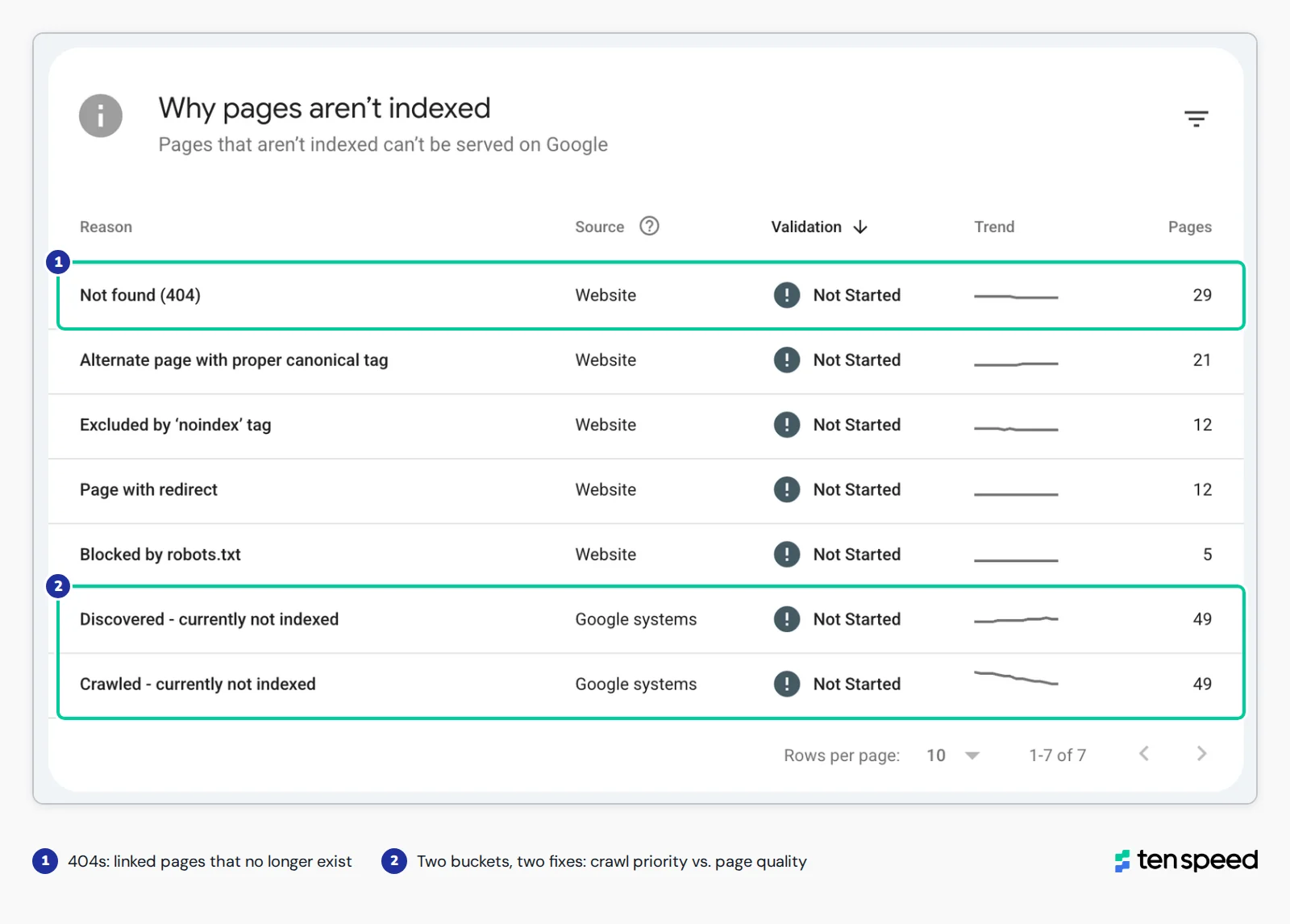
Then we go into the Page indexing report in Search Console and look at why pages aren't indexed. "Crawled, currently not indexed" usually means Google saw the page and didn't think it was worth keeping (often a duplicate or thin content issue). "Discovered, currently not indexed" usually means Google knows the page exists but hasn't gotten to it yet (often a crawl priority or internal linking issue). Those need different fixes, so it matters which bucket a page is in. Server logs fill in the rest. They show which pages crawlers actually visit and how often, which Search Console only partly shows.
Hear more: Crawl budget and content pruning from our podcast.
JavaScript rendering
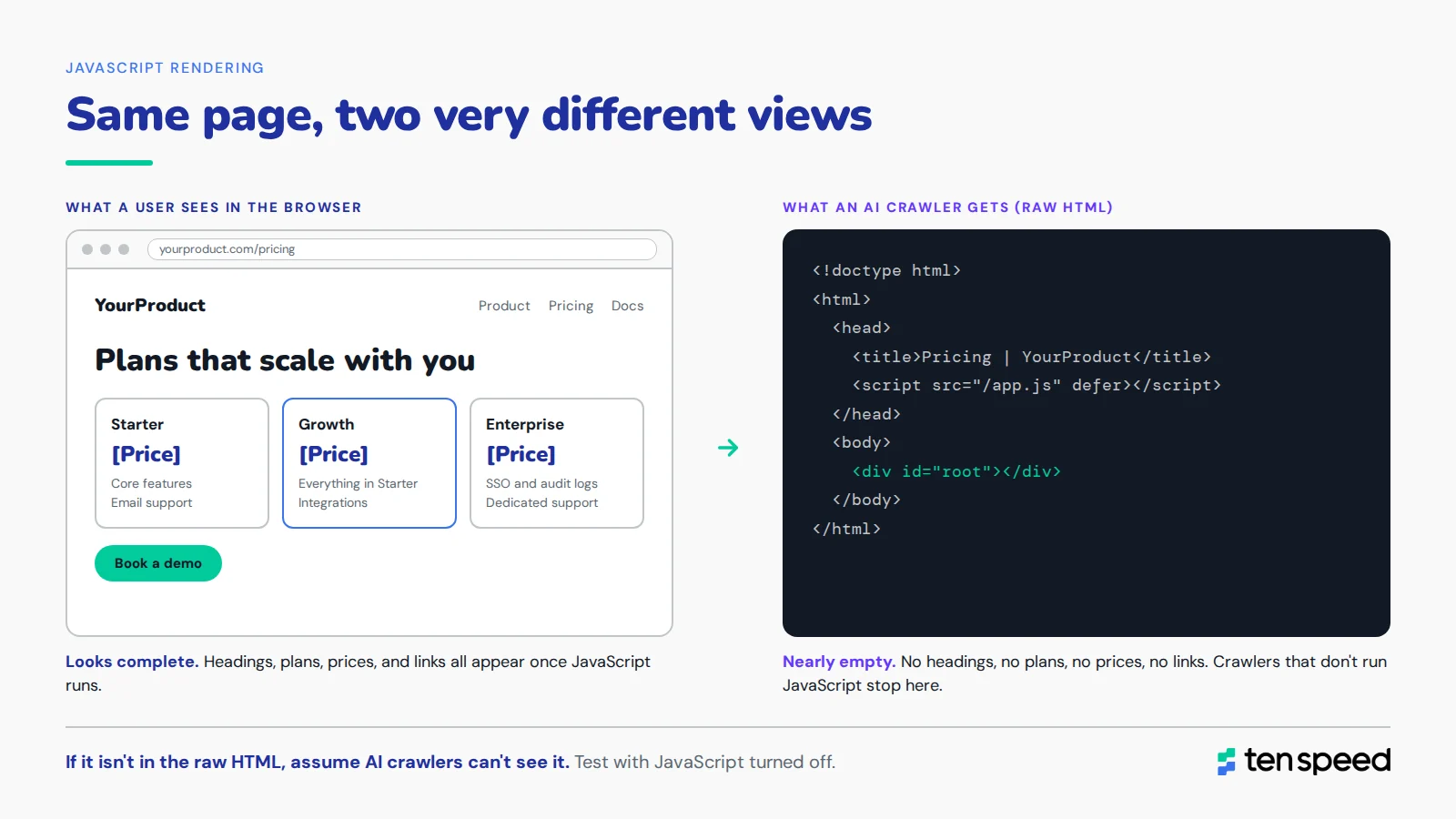
Modern B2B sites run on React, Vue, Next.js, and similar frameworks. Google can render JavaScript, but it's slower and less reliable than reading plain HTML. If your headings, body copy, or links only show up after scripts run, Google may index a thin version of the page.
AI crawlers are a bigger risk here. Many of them fetch the raw HTML and don't run JavaScript at all. A Vercel and MERJ study found that none of the major AI crawlers it measured render JavaScript. So the check is simple: compare what the server sends (view source, or load the page with JavaScript disabled) against what a user sees. If the important content is missing from the raw HTML, server-side rendering is the long-term fix.
Site architecture and internal linking
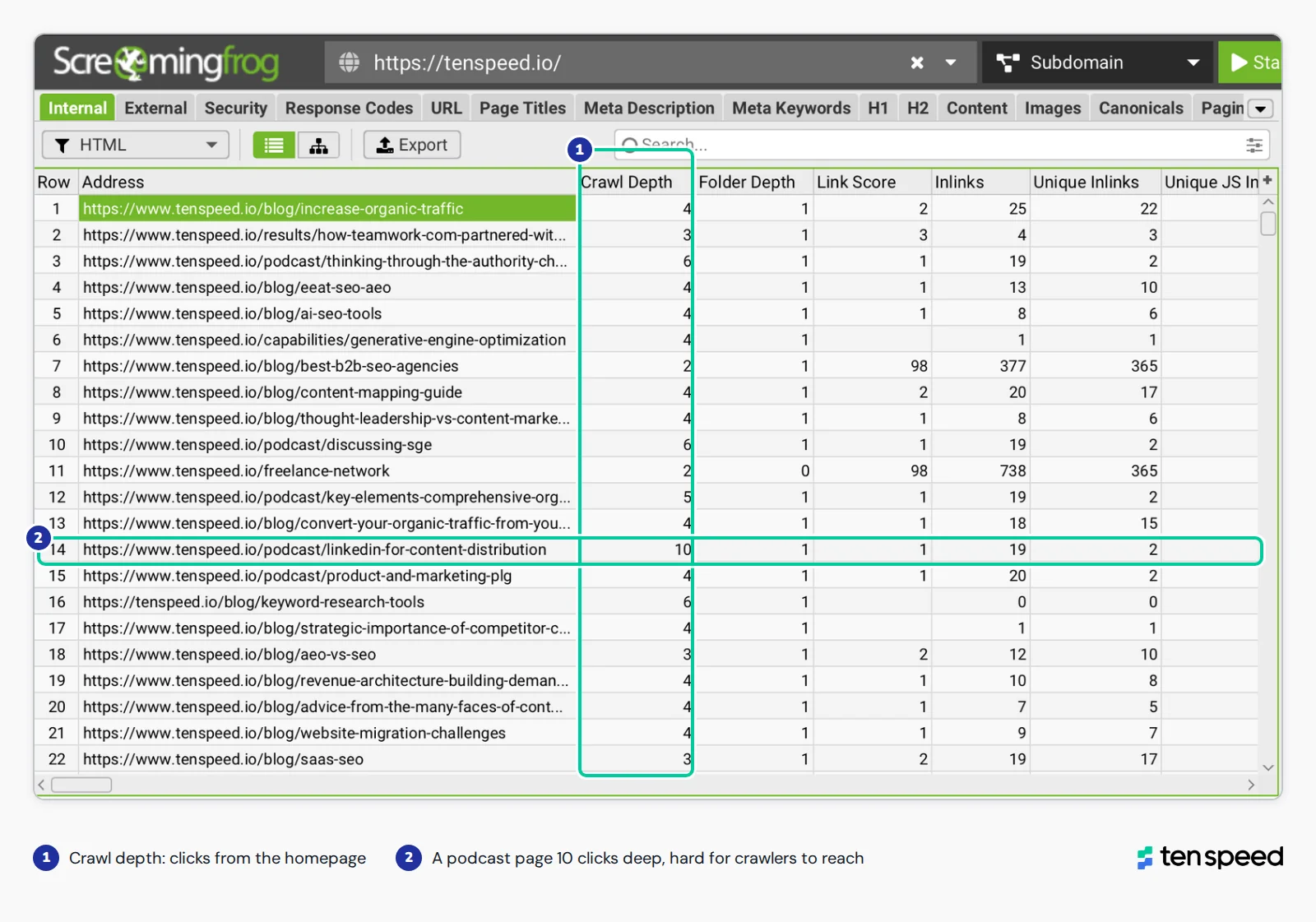
Important pages should be reachable within three or four clicks of the homepage, and they should have plenty of internal links pointing to them with anchor text that describes the page. We look at crawl depth, orphan pages (no internal links at all), and whether your educational content links to your commercial pages. On most B2B sites, the blog earns most of the links and traffic, and that value never makes it to the feature or solution pages.
We also check subfolder structure. A flat site (everything at the root) makes it harder for search engines and AI systems to understand how sections relate. A site nested six folders deep has the opposite problem.
Hear more: Internal linking and topic clusters and pagination and crawl depth.
Redirects and status codes
Redirect chains (a redirect to a redirect to a redirect) and loops cause the problems. So do internal links that still point to old URLs years after a redirect went in. A single redirect on its own is fine. We check every 3XX, 4XX, and 5XX on the site, but we look at navigation and core pages first, since a broken link in your main nav shows up on every single page.
Hear more: Redirect maps and redirect chains.
Duplicates and canonicals
Every page that should rank needs a canonical tag pointing to itself. Pages that are true duplicates should point to the original. We also check that the site is consistent about trailing slashes and www vs. non-www, since every variant is technically a separate URL. Near-duplicate content is part of this too (two blog posts on the same topic competing with each other), which is where a technical audit overlaps with content consolidation.
Page speed and Core Web Vitals
Google measures three Core Web Vitals:
INP replaced First Input Delay (FID) in 2024, so if your last audit still reports FID, it's out of date.
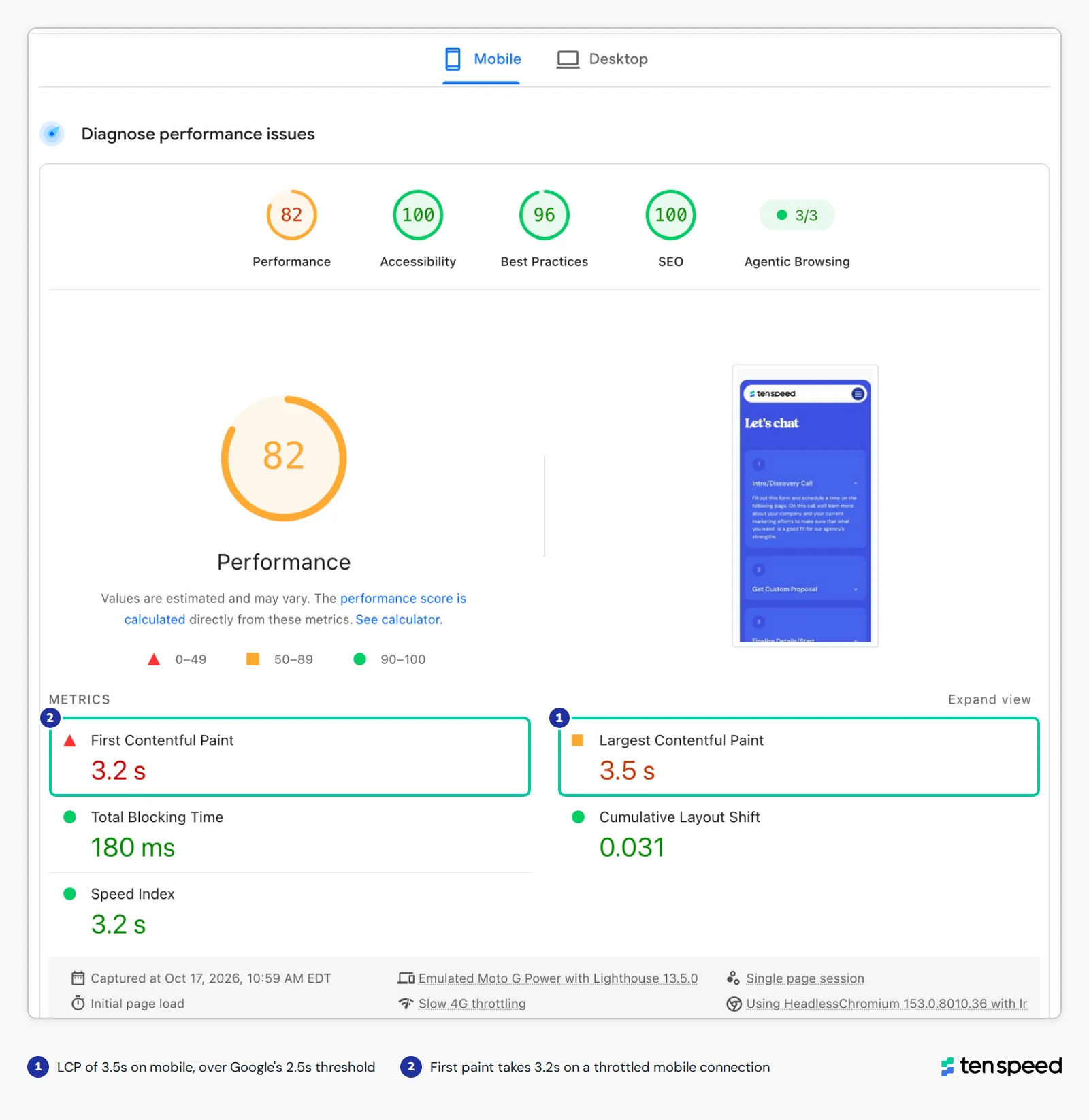
We test the templates that make money first: pricing, comparison, feature, and demo request pages, on mobile. A site can feel fast and still fail Core Web Vitals on the exact pages buyers use to evaluate you. On B2B sites, the usual causes are chat widgets, tracking scripts, and personalization tools that load before the content does.
Hear more: Why slower page speed is the most common migration mistake we see.
Structured data
Schema markup tells search engines and AI systems what a page is (an article, a product, an organization) and who's behind it (author, publisher). It makes pages easier to classify and eligible for rich results, though it doesn't directly boost rankings. We check which types exist, whether they validate, and whether they're on the right templates. The core set for most B2B sites is Organization, Article, Author, Breadcrumb, and Product or SoftwareApplication on product pages.
Hear more: Using a CMS move to fix schema and legacy issues.
Security and mobile
HTTPS on every URL, no mixed content, valid certificates on every subdomain. On mobile, no horizontal scrolling and no popups or interstitials that block the content. Google indexes the mobile version of your site, so mobile issues are indexing issues, not just user experience (UX) issues.
Beyond the standard checklist
The eight areas above are what most audits cover. Ours also include two things most technical audits skip, because they affect whether search engines and AI systems trust a page, not just whether they can reach it:
- AI readiness. AI crawler access (robots.txt and CDN settings), server logs that show which AI bots actually visit, whether pages work with JavaScript disabled, and whether the site meets accessibility standards. We cover this in detail in the AEO section below.
- Trust and freshness signals. Human authors with bios, visible publish and updated dates (that match the dateModified in your schema), content older than 12 months, and an About page that's accurate. We also flag off-site sentiment (review sites, Reddit) as an FYI, since it shapes how AI answers describe you. More on this in our byline framework for experience, expertise, authoritativeness, and trustworthiness (EEAT).
For a deeper look at specific issues and how to fix them, see our guide to technical SEO challenges.
How to run a technical SEO audit, step by step
You need four things to run an audit: Google Search Console, a site crawler (we use Screaming Frog), PageSpeed Insights, and an analytics source that shows lower-funnel impact (GA4 for conversions, or HubSpot for page-level revenue attribution). The analytics piece is what tells you which pages drive pipeline, so you know which fixes matter most. You should also get server logs whenever you can, either directly from your server or as an export from your host or content delivery network (CDN), and if you care about AEO (you should), add an AI visibility tracker so you have a baseline before you fix anything.
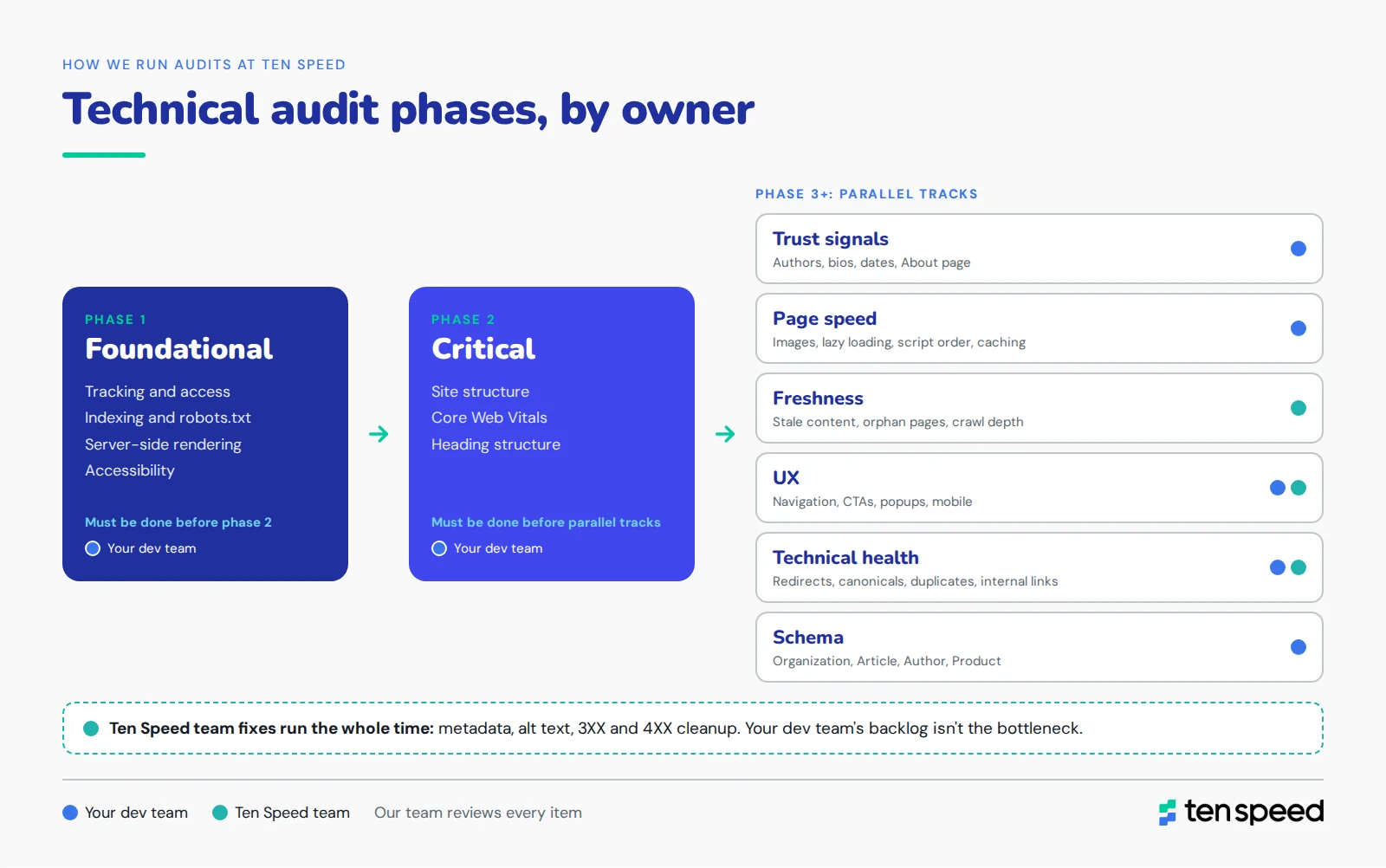
These are the steps we follow on every audit, in order.
1. Confirm tracking and access
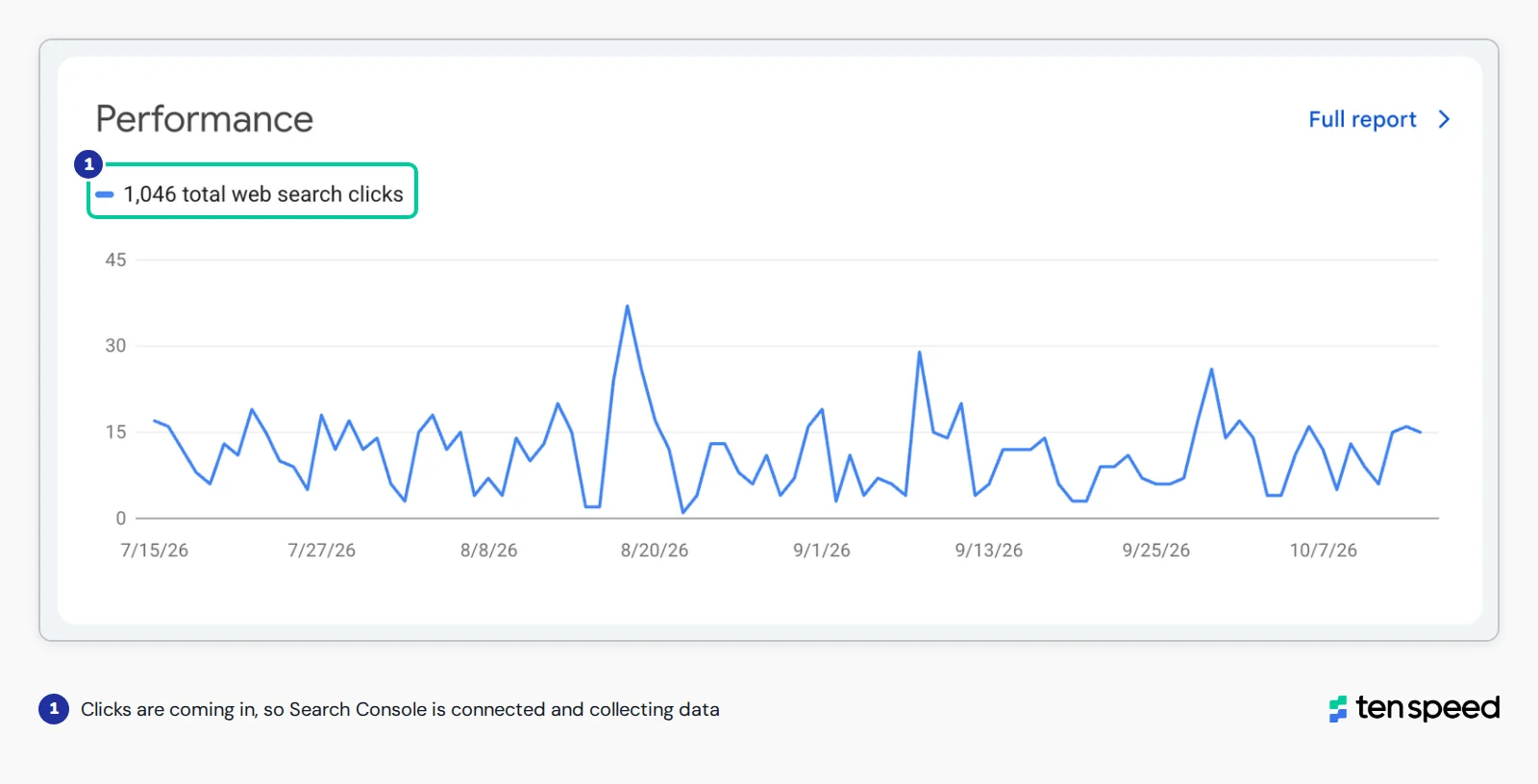
Make sure GA4 and Search Console are set up and pulling data, Google Tag Manager matches the live site, and you have access to the CMS. If the data is broken, every finding after this is unreliable.
2. Crawl the full site
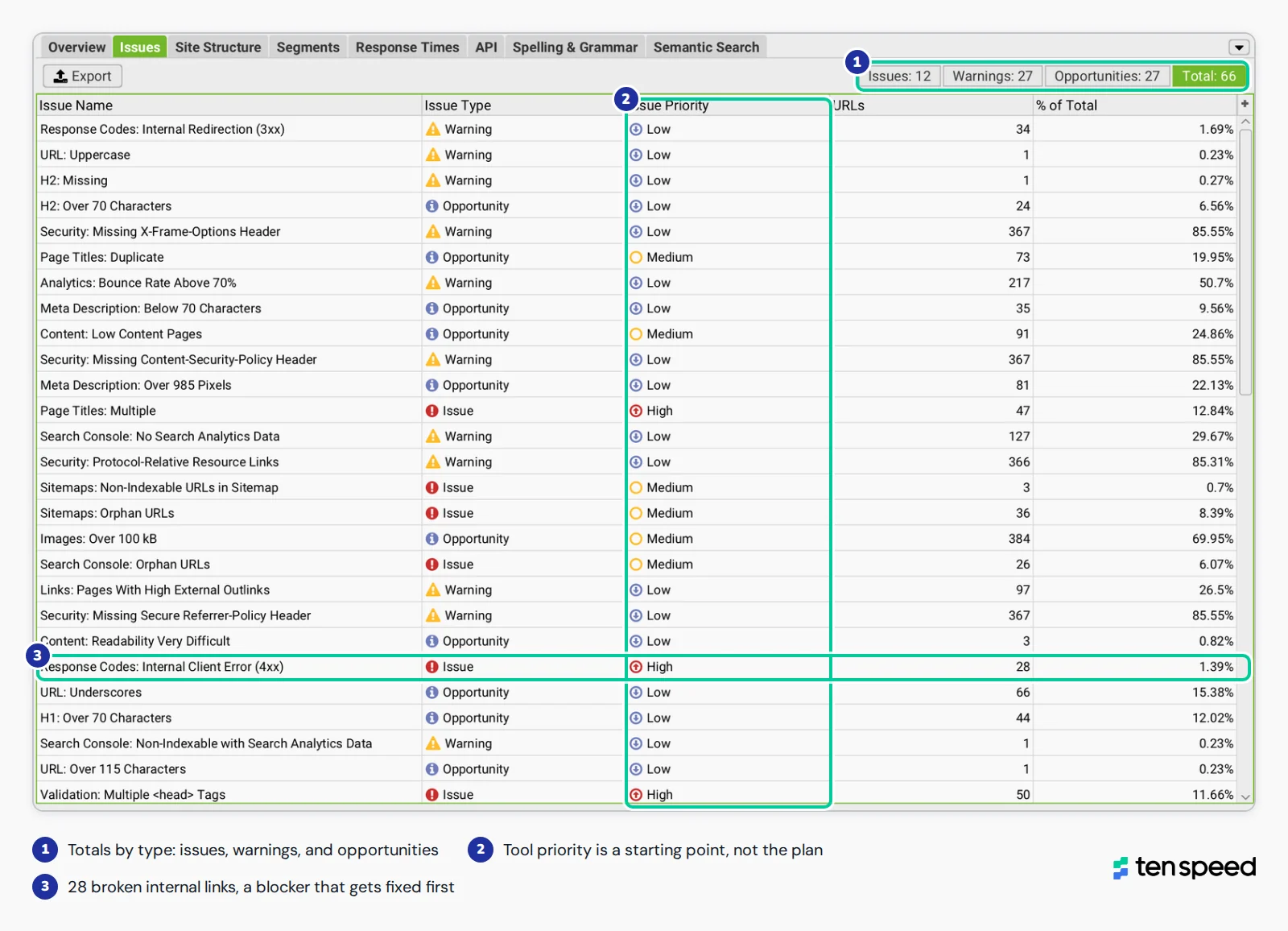
Crawl every URL, not a sample. Save the crawl, because you'll compare against it after fixes go live. How you set up the crawl matters as much as running it, since default settings can miss pages or give you a misleading picture of the site.
3. Check indexation
If you connected the URL Inspection API in step 2, your crawl already has index status for each page you inspected. Then open the Page indexing report in Search Console for the sitewide totals and the reasons pages aren't indexed. Compare the number of indexed pages to the number of pages you want indexed.
4. Compare raw and rendered HTML on key templates
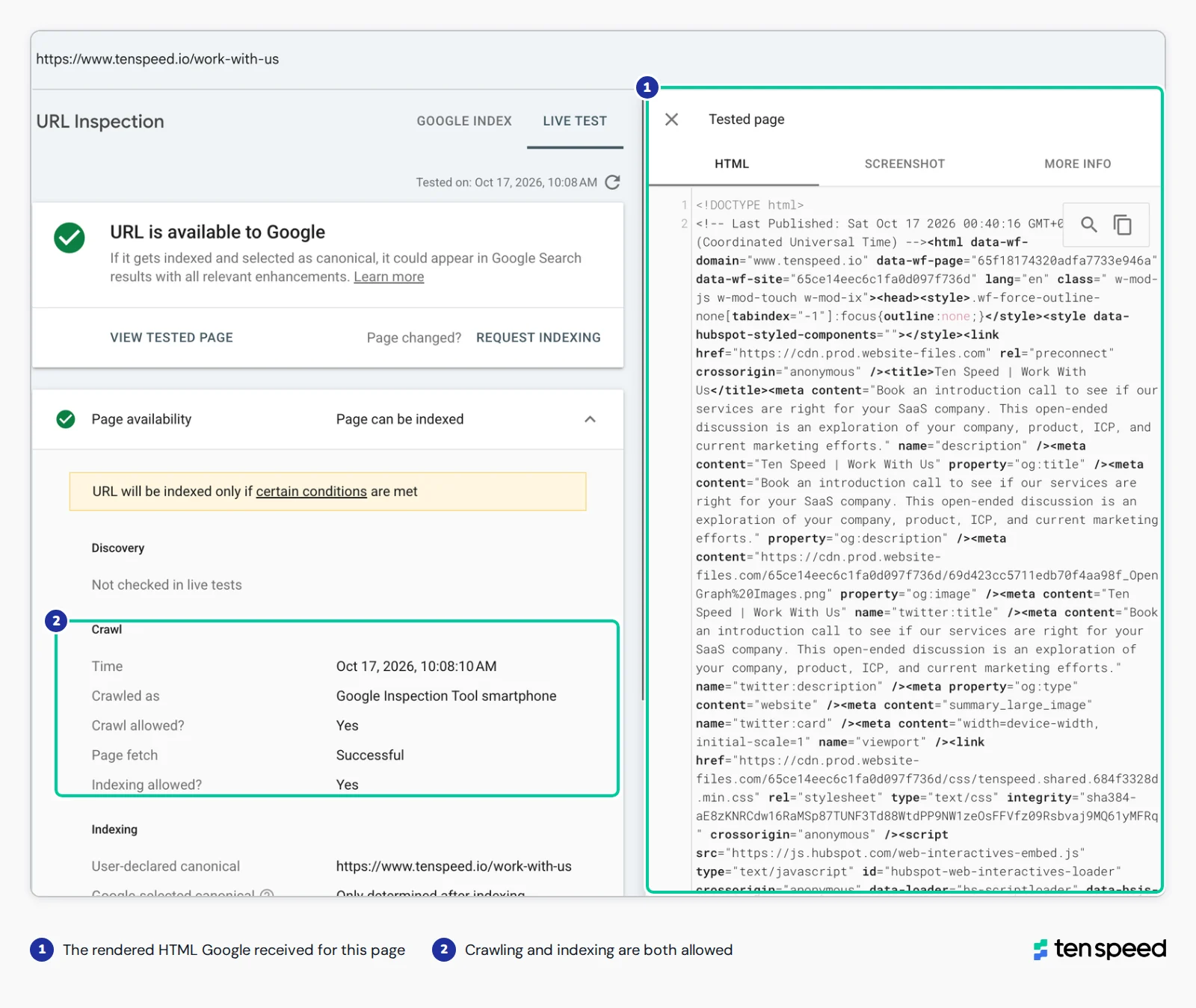
Use URL Inspection on your pricing, feature, comparison, and blog templates. Then load the same pages with JavaScript turned off. Anything important that disappears is a rendering problem.
5. Review robots.txt, sitemaps, and canonicals
Read robots.txt line by line. Confirm the sitemap lists the right pages and nothing else. Check that canonicals point where they should.
6. Test Core Web Vitals on revenue templates
Run PageSpeed Insights on mobile for your homepage, three core pages, and three blog posts at minimum. Then check the Core Web Vitals report in Search Console for real user data.
7. Audit internal linking and crawl depth
Find orphan pages, pages more than three or four clicks deep, and high-value pages with very few internal links pointing to them.
8. Validate structured data
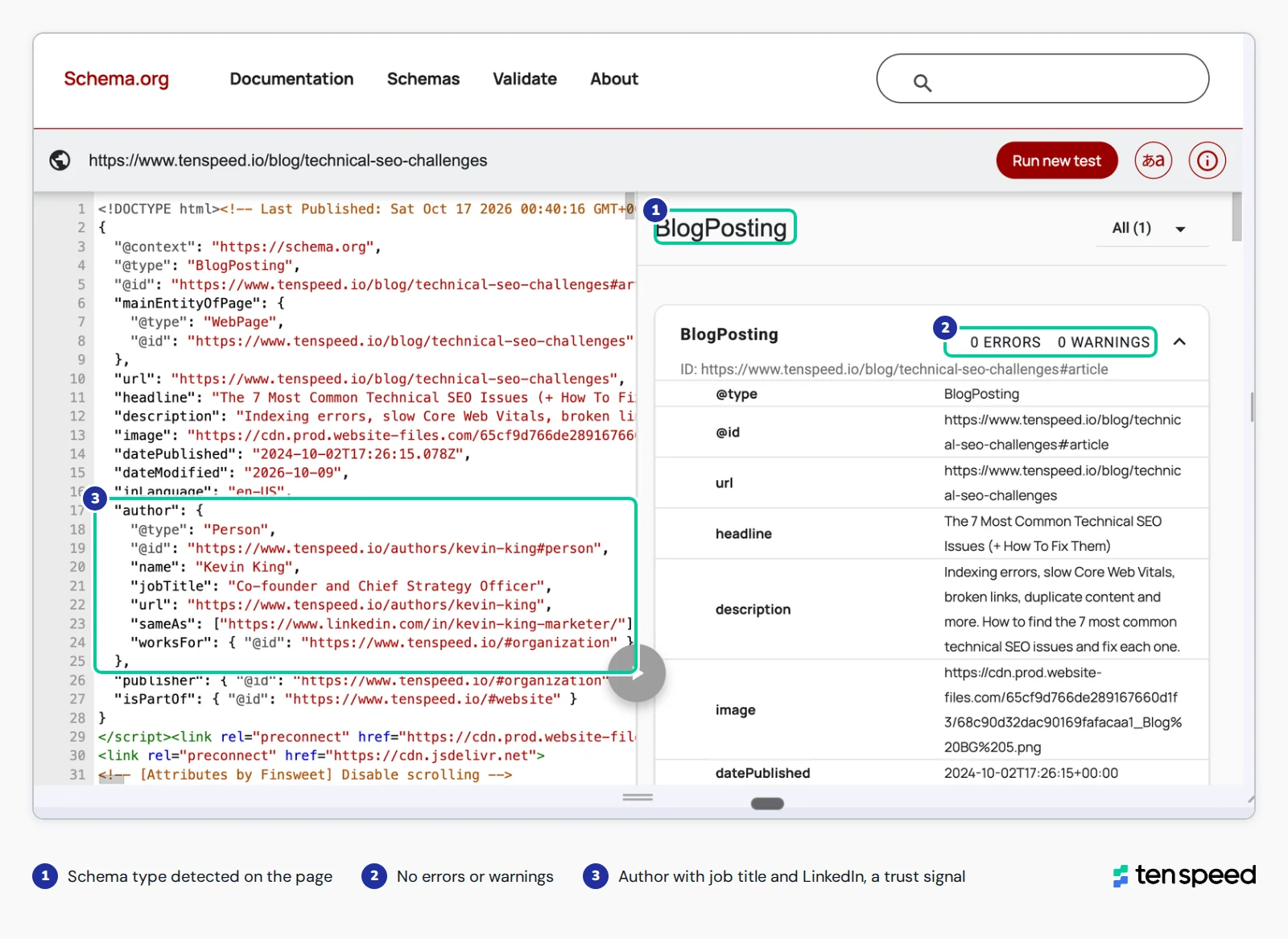
Run key templates through the Rich Results Test or the Schema Markup Validator. Look for errors, missing types, and schema that doesn't match what's on the page.
9. Check AI crawler access and JavaScript-off rendering
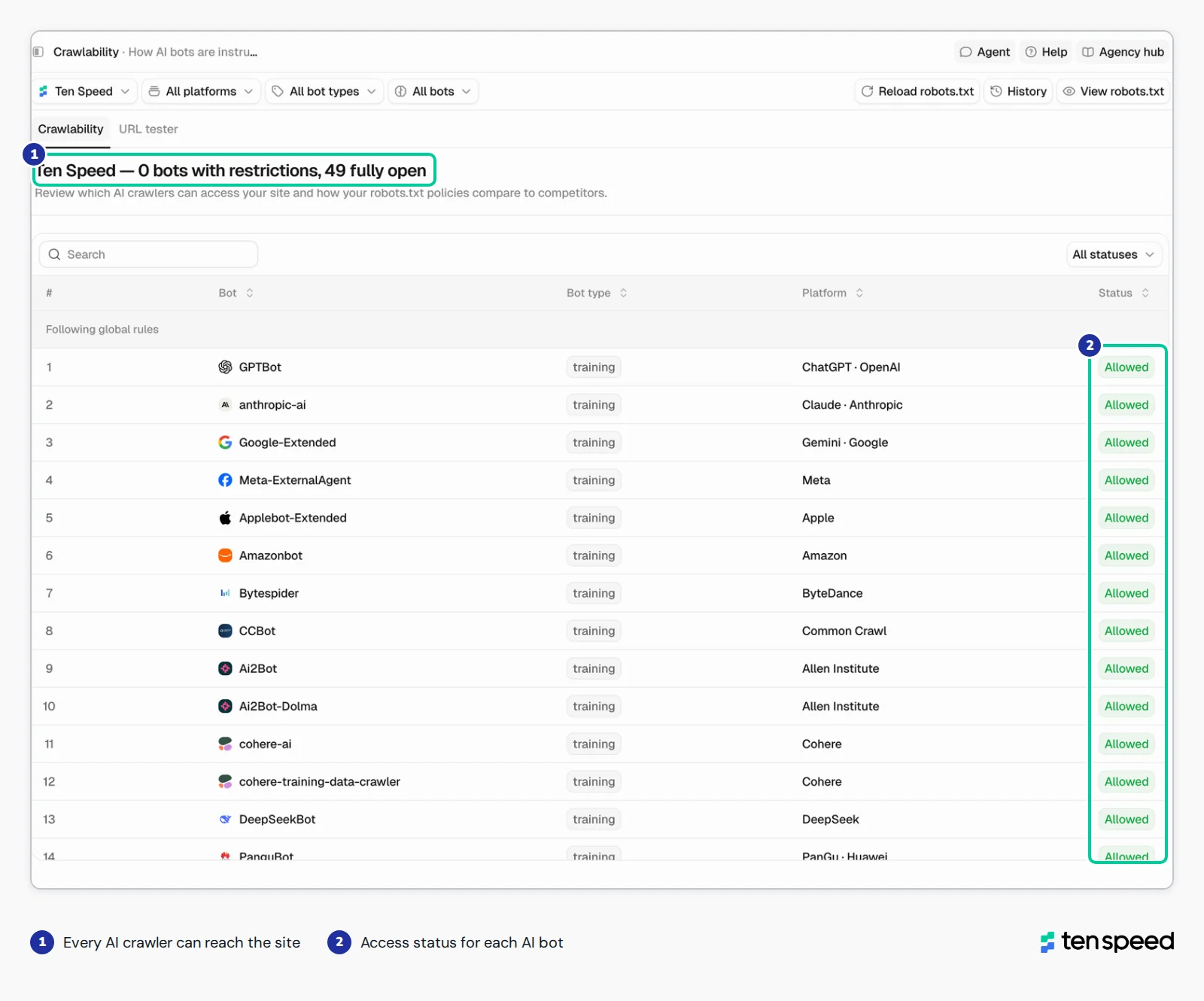
Confirm nothing is blocking the AI crawlers you want visiting, in robots.txt or at the CDN or firewall level (more on this below), and that your core content is in the raw HTML.
10. Review server logs
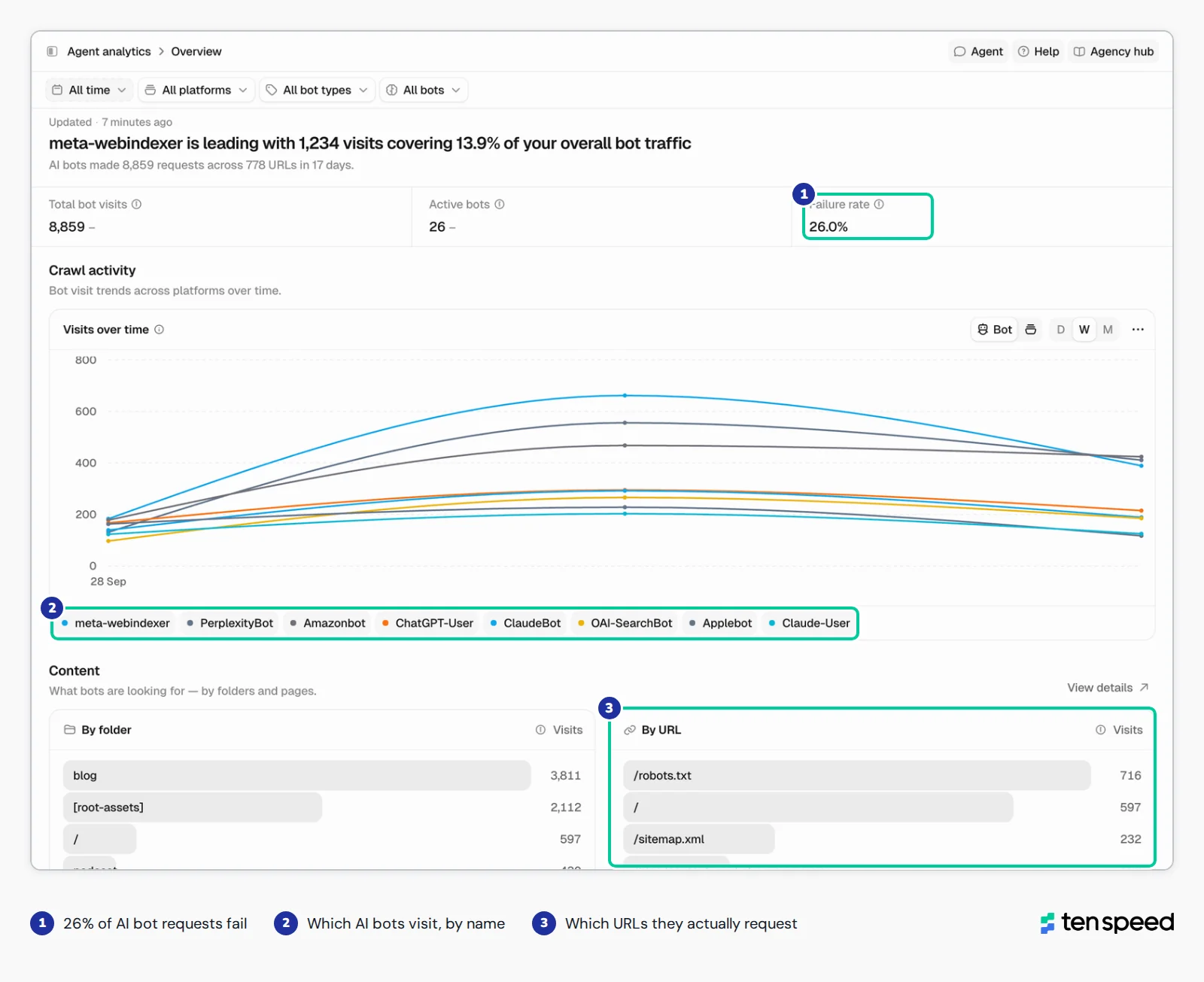
Logs record every request made to your server, so you can see which pages Googlebot and AI bots actually hit, how often, and which pages they skip. That's a literal picture of the crawl instead of a guess. If you have server access, pull the logs directly. If not, ask your host or CDN for an export. Even a rough log file works, since you can run it through AI to group requests by bot and by page. AI visibility tools are starting to cover this too. Peec AI, for example, reads your access logs and breaks down AI agent visits by bot, page, and response code.
11. Log every issue with an owner, priority, impact, and effort
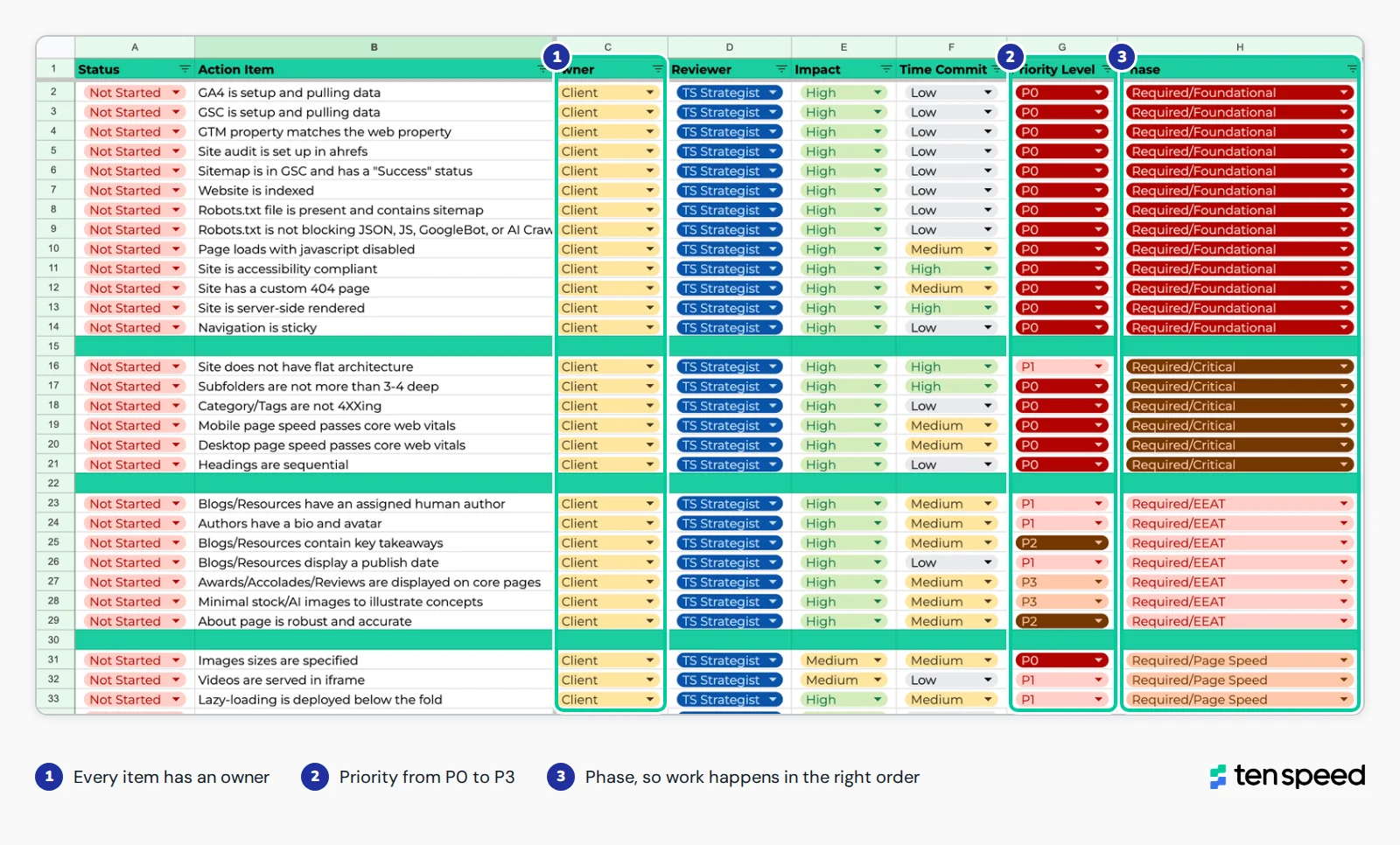
Most audits skip this step, and it's the reason most of them never get past the report. A list of 300 issues with no owners is just a list.
How to prioritize what you find
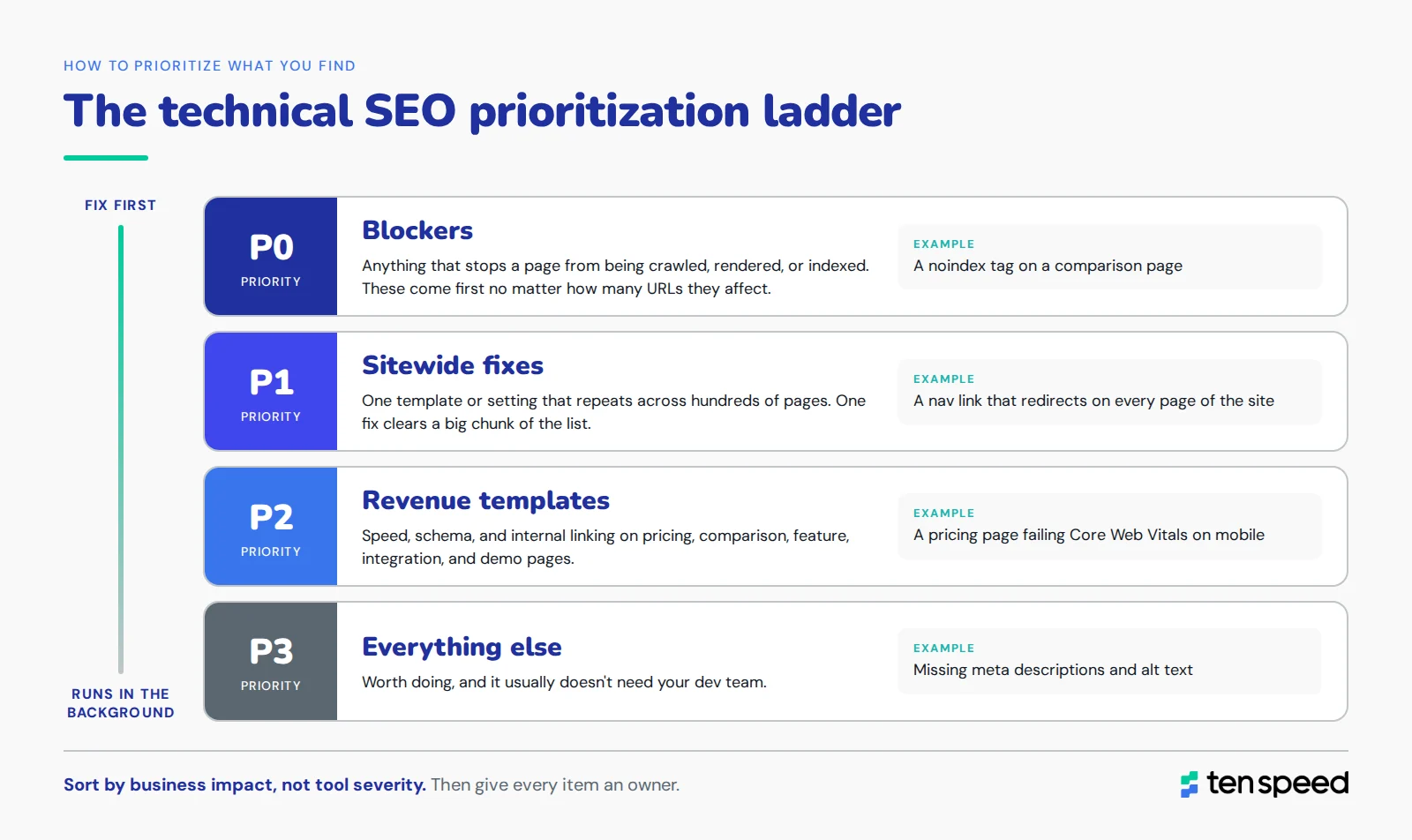
Your crawler will rank issues by severity. Don't use that as your plan. A tool doesn't know that your pricing page closes deals and your 2019 webinar archive doesn't. We sort every finding into this order:
- Blockers. Anything that stops a page from being crawled, rendered, or indexed. A noindex on a comparison page, a robots.txt rule blocking a whole folder, a core page returning a 404. These come first no matter how many URLs they affect.
- Sitewide fixes. Problems that come from one template or one setting and repeat across hundreds of pages. A nav link that redirects, a blog template with a broken canonical, a script that slows down every page. One fix clears a big chunk of the list, so these are the best return on dev time.
- Revenue templates. Speed, schema, and internal linking on the pages closest to pipeline: pricing, comparison, feature, integration, and demo pages.
- Everything else. Meta descriptions, alt text, minor redirects, long titles. Worth doing, but they can run in the background (and usually don't need your dev team).
Then assign an owner to every item. In practice, issues fall into three buckets: things your dev team has to change (rendering, site speed, templates), things your SEO/AEO team or agency can change in the CMS (internal links, metadata, redirects in many setups), and things that need a decision from someone (sunsetting old content, changing URL structure). The last bucket is the one that stalls, so name a person for each one. Overthinking also gets in the way here. Teams can spend months debating whether to remove a page, and making a quick decision matters more than making a perfect one. Old, stale content usually isn't sacred, even if some people on the team think it is, and removing or consolidating it is one of the most effective fixes on the list.
We go deeper on sorting fixes by pipeline impact in technical SEO for B2B, and on how to fix specific issues in technical SEO challenges.
Technical SEO audits for B2B SaaS sites
Most technical SEO advice targets ecommerce or small business sites. B2B software-as-a-service (SaaS) sites break in different places, so the audit should look in different places.
Audit by page type. Your pricing, comparison, feature, integration, and demo pages are where rankings turn into pipeline. Check them first, on mobile, with JavaScript off. Your crawler's sitewide health score can be 90 or higher while these pages still have problems that cost you leads.
Watch for templates that create too many pages. Teams add integration pages, release notes, and programmatic landing pages constantly, usually from one template with no canonical or indexing rules. Fifty integration pages with near-identical copy is an indexation problem waiting to happen.
Check where the docs live. Help docs on a separate subdomain (docs.yourproduct.com) are common, and the main site often links to them poorly. Some docs pages answer real buyer questions and deserve indexing and links from product pages. Others (one-line error stubs, internal search results) probably need a noindex tag.
Plan for JavaScript. If your marketing site runs on a JavaScript framework, rendering checks aren't optional. It's a common reason SaaS feature pages underperform, and it can hurt AI visibility even more than Google rankings.
The AEO layer: Auditing for AI answer engines and agents
Most of AEO's technical foundation is the same as SEO's. Google's AI Overviews and AI Mode pull from Google's own index, so a page that's indexed and eligible for a snippet in regular search is eligible there too. But other AI systems crawl the web on their own, with their own crawlers and their own limits, so we add a few checks.
AI crawler access. Check robots.txt for rules that block AI crawlers, on purpose or by accident. A lot of sites added blanket blocks in 2023 and 2024 and never revisited them. Then check your CDN or firewall settings, because a block there overrides whatever robots.txt says. Cloudflare, for example, has blocked known AI crawlers by default on new domains since July 2025, so a site can have an open robots.txt and still be invisible to AI search. The main crawlers to know:
Sources: OpenAI, Anthropic, Perplexity, Google. Vendors update these lists, so check them again before you change your robots.txt.
Server logs. Your robots.txt file tells you what you allow bots to do. Server logs tell you what they actually do. We look at which AI bots are visiting, how often they come back, and which pages they spend their time on. On a lot of sites, bot activity is a mess. Teams assume ChatGPT and Perplexity are reading their pricing and product pages, and the logs show the bots spending most of their visits on old blog posts, redirected URLs, or not showing up at all. You can't fix that if you never look. Most of the competing advice on technical audits skips this step, and for AEO, it's one of the most revealing checks we run.
The pattern to know: Crawlers for search and user requests are how you show up in AI answers, so block those and you're opting out. Training crawlers are a separate decision your team can make on its own terms.
Rendering without JavaScript. Load your key pages with JavaScript disabled. If the headings, body copy, and links are still there, you're in good shape. If you get a blank page or a spinner, a lot of AI crawlers are getting the same thing.
Accessibility. AI agents that browse sites on a user's behalf rely on clean page structure: real headings, labeled buttons, links that say where they go. The same things that make a site work for screen readers make it easier for agents to read. OpenAI, for example, says its ChatGPT agent in Atlas uses Accessible Rich Internet Applications (ARIA) tags, the same labels and roles screen readers rely on, to interpret page structure. That's why accessibility sits in the foundational phase of our audits.
Schema and entity clarity. Organization, Author, and Article schema give AI systems a clear, machine-readable version of who you are, who wrote the page, and when it was updated. Make sure it matches what's visible on the page.
Freshness. Visible updated dates, accurate dateModified in schema, and content that reflects your current product. AI answers that cite an outdated page about you are a real problem, and an audit is the time to find those pages.
The technical layer is only one part of AEO. Whether AI answers mention and recommend you also depends on your content, which prompts you cover, and what other sites say about you. For how we approach the full picture, see our AEO services.
Can AI run a technical SEO audit?
Partly, and we use it a lot. AI is great at the parts of an audit that are big and repetitive: going through every URL in a crawl export, grouping issues by template, spotting patterns across thousands of pages, and drafting the first version of a fix list. Work that used to take a strategist a few days now takes a few hours.
Where it falls short is verification and judgment. AI tools tend to fill in gaps instead of confirming them (i.e., read part of a page and assume the rest is marked up the same way). You can close some of that gap by giving AI more context. With analytics and attribution connected, it can see that a page with 40 visits a month drives a third of your demo requests. What it still doesn't have is the nuance of your business: your dev team can ship template changes but can't touch the server config this quarter, a product line is being sunset next year, or sales leans on a page that looks low-value on paper. Deciding what to fix first, and what to leave alone, still takes someone who knows those things.
So our process is AI-assisted and human-verified. AI does the heavy lifting on the data. A strategist checks the findings against the live site and Search Console, decides what matters, and assigns the work. If someone sends you an audit that clearly came from a prompt and a URL, that second half is usually what's missing.
After the audit: How to know your fixes worked
The audit report is the starting point. You still need to confirm the fixes went live and did what they were supposed to. We check five things.
- Recrawl and compare. Run the same crawl again and compare it against the original. Issues that should be gone should be gone, and nothing new should have broken in the process.
- Request indexing on priority pages. Use URL Inspection to request indexing on the pages you fixed, starting with the ones closest to revenue.
- Watch the Page indexing report. Give it two to four weeks. Pages moving from "not indexed" to "indexed" is the first real signal.
- Check the logs again. Confirm Googlebot and AI bots are visiting the pages you fixed, and that crawl activity is moving toward the pages that matter.
- Track the SEO and AEO signals side by side.
We grab an AI visibility baseline before we fix anything for exactly this reason. Without the before number, you can't show the after.
Hear more: Tracking AI visibility before and after a big site change.
How often to run a technical SEO audit
For most B2B sites, a full technical audit once every other quarter is a good cadence, with lighter monthly checks on indexing and Core Web Vitals in Search Console. Some events should trigger an audit right away, no matter when the last one was.
Migrations deserve extra attention. We've seen more traffic lost to a rushed migration than to any algorithm update. Our website migration challenges guide and migration checklist cover the full process.
DIY vs. hiring an agency
You can run a solid technical audit yourself with Search Console, a crawler, and PageSpeed Insights. The hard part usually isn't finding the issues. It's knowing which ones matter, getting them prioritized, and getting your dev team to ship the fixes.
If you go the agency route, ask to see a sample audit before you sign. You want owners, priorities, and a plan, not a 200-row export. Our roundup of the best technical SEO agencies is a good place to start comparing options.
Frequently asked questions
What is a technical audit in SEO?
It's a review of the technical side of your site: Whether search engines and AI systems can crawl it, render it, index it, and understand it. It covers things like robots.txt, sitemaps, redirects, canonicals, site speed, structured data, and AI crawler access. It doesn't cover keywords or content quality. That's a broader SEO or content audit.
What does a technical SEO audit include?
At minimum: crawlability and indexation, JavaScript rendering, site architecture and internal linking, redirects and status codes, duplicates and canonicals, Core Web Vitals, structured data, and HTTPS and mobile. A good audit also checks AI crawler access and trust signals like authorship and dates, and ends with a prioritized list where every issue has an owner.
Why is a technical SEO audit important?
Because technical problems can cost you rankings, AI citations, and pipeline if nobody catches them, and most of them don't show an obvious error. A noindexed page or a page that doesn't render for crawlers still looks fine to your team. An audit finds those problems early.
Is a technical SEO audit the same as an AEO audit?
No. A technical audit is one part of AEO. It tells you whether AI systems can reach and read your pages. A full AEO or AI visibility audit also looks at which prompts you show up for, how often you're cited, and what other sites say about you.
Can ChatGPT do an SEO audit?
It can help, but it can't do the whole thing on its own. ChatGPT and other AI tools speed up work like sorting crawl data, grouping issues, and drafting fixes. On their own, they can't crawl your full site or see your Search Console data. Even with that context connected, they don't know the business details that decide what to fix first. Use AI to speed up the analysis and a person to verify and prioritize.
Can I do my own technical SEO audit?
Yes. Search Console, a crawler, and PageSpeed Insights cover most of it, and the steps in this guide are the same ones we use. Where teams usually get stuck is prioritizing the findings and getting dev time to fix them, especially on larger or JavaScript-heavy sites.
How long does a technical SEO audit take?
It depends mostly on site size and complexity. The crawl itself is fast. The time goes into checking findings, figuring out root causes, and building a prioritized plan.
How often should you run a technical SEO audit?
Every other quarter for most B2B sites, plus right before and after any migration, redesign, CMS change, or big launch. Run one any time traffic or AI citations drop and the content hasn't changed.
